 Kevin Martínez
React Testing Setup: Vitest + TypeScript + React Testing Library
In this post, I’ll walk you through how to set up a React app using Vite and TypeScript with Vitest and React Testing Library.

In this post, I’ll walk you through how to set up a React app using Vite and TypeScript with Vitest and React Testing Library.
This kind of setup isn’t included by default in Vite, and it can be a bit tedious the first time you try it. So, here’s a quick guide to help you get everything running smoothly.
If you prefer to skip the explanations and just want the final result, you can jump to the summary section at the end, where I list all the required installations and final file versions.
1. Create a New React + TypeScript Project
Start by creating a new Vite app:
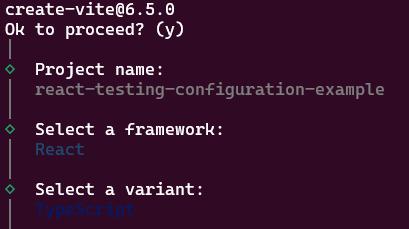
npm create vite@latestWhen prompted, name the project:
react-testing-configuration-exampleThen choose:
- Framework: react
- Variant: TypeScript
Now install dependencies and start the dev server:
cd react-testing-configuration-example
npm install
npm run dev
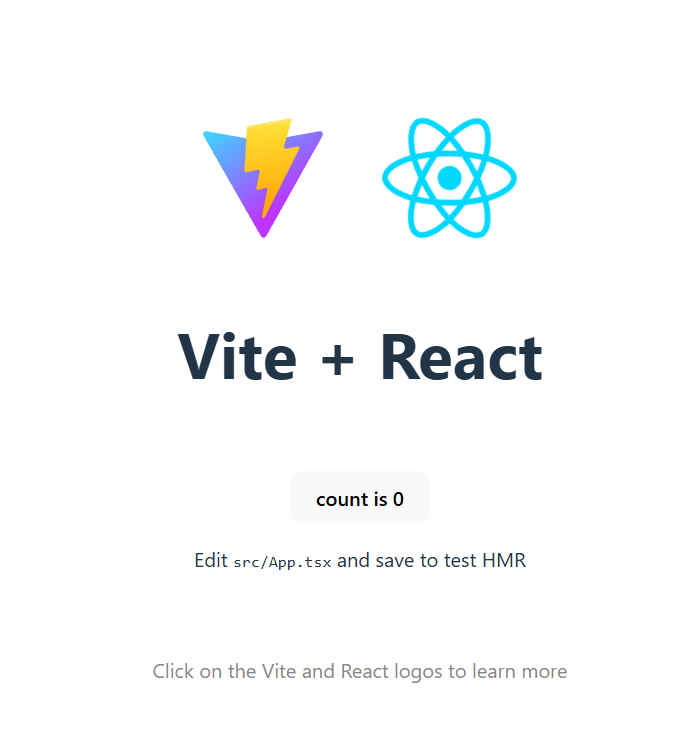
You should see the default React app running at http://localhost:5173/.
2. Add Vitest
Install Vitest as a dev dependency:
npm install -D vitestThen update your package.json scripts:
"scripts": {
  "dev": "vite",
  "build": "tsc -b && vite build",
  "lint": "eslint .",
  "test": "vitest",
  "preview": "vite preview"
},
Create your first test file in src/tests/app.spec.ts. The filename must include .spec or .test for Vitest to recognize it:
import { describe, it, expect } from 'vitest';

describe('Simple truthy test', () => {
  it('should expect true to equal true', () => {
    expect(true).toEqual(true);
  });
});
Run the tests:
npm test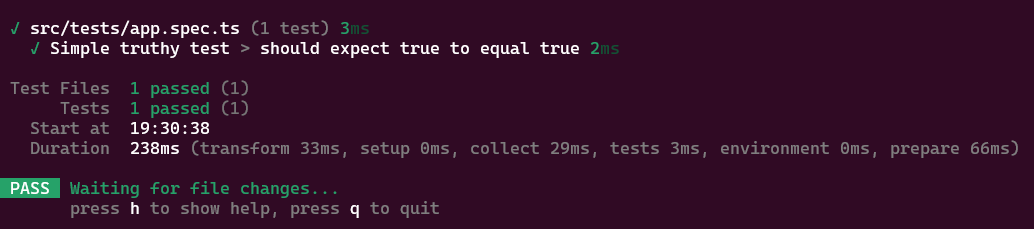
3. Enable Global Test Functions
Usually, you don’t want to import describe, it, and expect in every file.
To enable global test functions, update your vite.config.ts:
/// <reference types="vitest" />
import { defineConfig } from 'vite'
import react from '@vitejs/plugin-react'

export default defineConfig({
  plugins: [react()],
  test: {
    globals: true,
  },
})
Then make sure TypeScript knows about the global types.
In your tsconfig.app.json, add:
{
  "compilerOptions": {
    "types": ["vitest/globals"],
    "tsBuildInfoFile": "./node_modules/.tmp/tsconfig.app.tsbuildinfo",
    "target": "ES2020",
    "useDefineForClassFields": true,
    "lib": ["ES2020", "DOM", "DOM.Iterable"],
    "module": "ESNext",
    "skipLibCheck": true,

    /* Bundler mode */
    "moduleResolution": "bundler",
    "allowImportingTsExtensions": true,
    "verbatimModuleSyntax": true,
    "moduleDetection": "force",
    "noEmit": true,
    "jsx": "react-jsx",

    /* Linting */
    "strict": true,
    "noUnusedLocals": true,
    "noUnusedParameters": true,
    "erasableSyntaxOnly": true,
    "noFallthroughCasesInSwitch": true,
    "noUncheckedSideEffectImports": true
  },
  "include": ["src"]
}
This removes the TypeScript errors for global functions like describe.
4. Add React Testing Library
Install the testing libraries:
npm install --save-dev @testing-library/react @testing-library/dom @types/react @types/react-domRename your test file to app.spec.tsx (so JSX is supported), and update it:
import { render, screen } from '@testing-library/react';
import App from '../App';

describe('App component', () => {
  it('renders the Vite + React heading', () => {
    render(<App />);
    expect(screen.getByText(/Vite \+ React/i)).toBeInTheDocument();
  });
});
If you run the tests now, you’ll likely get an error related to the DOM environment:
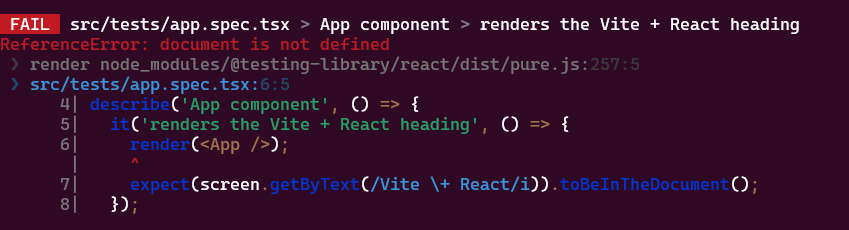
Install jsdom to fix that:
npm i --save-dev jsdomUpdate your vite.config.ts:
/// <reference types="vitest" />
import { defineConfig } from 'vite'
import react from '@vitejs/plugin-react'

// https://vite.dev/config/
export default defineConfig({
  plugins: [react()],
  test: {
    globals: true,
    environment: "jsdom",
  },
})
5. Fix toBeInTheDocument Assertion Error
Install jest-dom:
npm install --save-dev @testing-library/jest-domCreate a global test setup file at src/tests/setup.ts:
import { afterEach } from 'vitest'
import { cleanup } from '@testing-library/react'
import '@testing-library/jest-dom';

// runs a clean after each test case (e.g. clearing jsdom)
afterEach(() => {
  cleanup();
});
And update your vite.config.ts again:
/// <reference types="vitest" />
import { defineConfig } from 'vite'
import react from '@vitejs/plugin-react'

// https://vite.dev/config/
export default defineConfig({
  plugins: [react()],
  test: {
    globals: true,
    setupFiles: "./src/tests/setup.ts",
    environment: 'jsdom'
  },
})
Now your RTL assertions like toBeInTheDocument will work perfectly.

6. Bonus: Testing User Events
Install user-event:
npm install --save-dev @testing-library/user-eventUpdate your test file to include a counter interaction:
import { render, screen } from '@testing-library/react';
import userEvent from '@testing-library/user-event';
import App from '../App';

describe('App component', () => {
  it('renders the Vite + React heading', () => {
    render(<App />);
    expect(screen.getByText(/Vite \+ React/i)).toBeInTheDocument();
  });

  it('increments the counter when button is clicked', async () => {
    render(<App />);
    const button = screen.getByRole('button', { name: /count is/i });
    expect(button).toHaveTextContent('count is 0');
    await userEvent.click(button);
    expect(button).toHaveTextContent('count is 1');
  });
});
Now you’re ready to write modern, robust tests in your React + Vite + TypeScript apps!
Final Summary
Here’s a full list of commands you can run to install everything in one go:
npm install -D vitest jsdom @testing-library/react @testing-library/dom @types/react @types/react-dom @testing-library/jest-dom @testing-library/user-eventvite.config.ts (Final)
/// <reference types="vitest" />
import { defineConfig } from 'vite'
import react from '@vitejs/plugin-react'

export default defineConfig({
  plugins: [react()],
  test: {
    globals: true,
    setupFiles: './src/tests/setup.ts',
    environment: 'jsdom',
  },
})
tsconfig.app.json (Update)
{
  "compilerOptions": {
    "types": ["vitest/globals"]
    // ...rest of your config
  }
}
src/tests/setup.ts
import { afterEach } from 'vitest';
import { cleanup } from '@testing-library/react';
import '@testing-library/jest-dom/vitest`;

afterEach(() => {
  cleanup();
});